Consumer

  • Consumer
  • Business

      Blog

      The Ultimate Holiday Tech Guide: Top Gadgets & Gaming Consoles for 2025

      Posted by Olivia G. on Dec 11, 2025 1:56:58 PM

      Holiday Devices 2025

      The holiday season always brings excitement—cozy gatherings, festive traditions, and of course, the thrill of unwrapping the latest tech. Whether you're shopping for gamers, music lovers, or anyone who appreciates great design, this year’s lineup of devices offers something for everyone. And as more entertainment moves online, fast and reliable internet at home makes every device perform at its best.

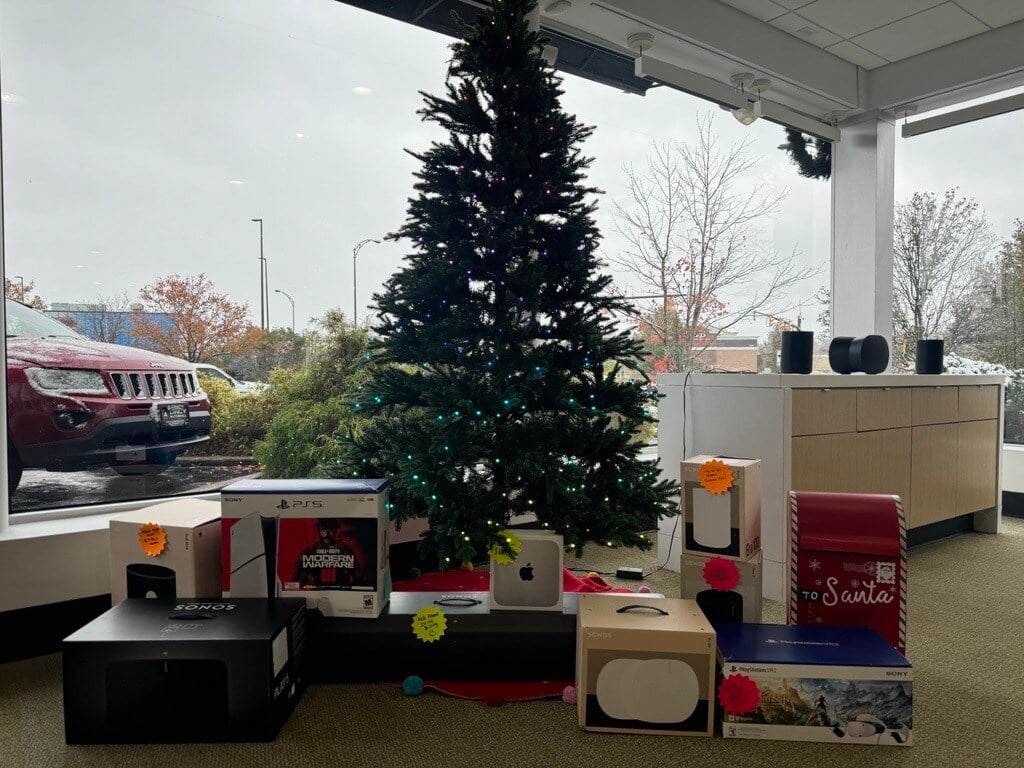
      Here’s a look at the top tech gifts stealing the spotlight this holiday season—available now at all altafiber retail stores. 

      Nintendo Switch 2 

      The long-awaited Nintendo Switch 2 is finally here, packed with major upgrades. With smoother performance, brighter visuals, and faster load times, the new model enhances the beloved hybrid design while delivering a more immersive experience. Whether docked to your TV or taken on the go, it’s an ideal choice for families, travelers, and fans of Nintendo’s iconic game library.

      Watch our Nintendo Switch 2 unboxing with professional gamer, Stephen “Doorstop” Schmidt, from Cincinnati Fear!  

      PlayStation 5 

      Even years into its lifecycle, the PlayStation 5 remains one of the best gaming consoles available. Its ultra-fast SSD, stunning 4K graphics, and expanding lineup of exclusive titles make it a dream for gamers. Pair it with strong home fiber internet for smooth downloads, crisp streaming, and lightning-fast game updates.20251202_164043718_iOS
       PlayStation Portal 

      For families where the TV is always in use, the PlayStation Portal is a game-changer. This sleek handheld device streams your PS5 games over home Wi-Fi, giving you console-quality gameplay from the couch, kitchen, or back patio.

      Xbox Series X 

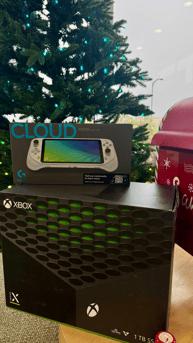
      The Xbox Series X continues to stand out with its powerful hardware and unbelievably fast load times. Paired with Xbox Game Pass, users get access to hundreds of AAA and indie titles. It’s a fantastic choice for players who value top-tier performance and a massive library of games.

      Logitech Cloud Gaming Handheld 

      Cloud gaming is rapidly growing, and the Logitech Cloud Gaming Handheld is one of the easiest ways to jump in. Lightweight, portable, and designed for instant access to services like Xbox Cloud Gaming NOW, it’s perfect for families on the go. Simply connect to fast, reliable Wi-Fi and start playing—no downloads required.

      Watch Matt, our unboxing expert, open the Xbox X & Logitech Cloud Gaming Handheld Device! 

      Sonos Ace Headphones 

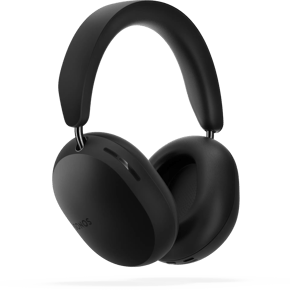
      Sonos has officially entered the headphone space with the luxurious Sonos Ace, and they’re already earning rave reviews. With rich sound, premium noise cancellation, and seamless integration with Sonos home speaker systems, these headphones are ideal for music, movies, podcasts, and gaming. 

      Sonos Move 2 

      Whether it’s a holiday party, a family gathering, or a quiet night by the fireplace, the Sonos Move 2 delivers an impressive, room-filling sound anywhere you need it. With improved battery life, rugged outdoor durability, and both Wi-Fi and Bluetooth connectivity, it’s one of the most versatile speakers available today. 
      I want to purchase a console this holiday season but I have questions. No fear, altafiber is here! Check out commonly asked questions related to these consoles.  

      Frequently Asked Questions

      Do any of these systems have parental controls? Can you block certain games, specific ratings, limiting online communications, restricting in-game purchases? Can you set daily limits on game play? 

      Switch 2: Yes, you can manage parental controls through the Nintendo Switch Parental Controls smart device app or directly on the console. The app provides the most extensive options, including setting daily play time limits, blocking specific games based on age ratings, and restricting online communication features like GameChat for children under 16 

      Xbox X: Yes, parental controls on Xbox Series X are managed through the console's settings or the mobile Xbox Family Settings app, allowing parents to set age limits for games/movies, control screen time, manage spending, filter web content, and restrict online communication via child accounts 

      PS5: Yes, you can set up parental controls on a PS5 by navigating to Settings > Family and Parental Controls on the console or using the PlayStation Family app. This allows you to manage child accounts to restrict game age ratings, set spending limits, control online communication, and limit playtime 

      Do all of these systems have online multiplayer play? Can you disable that? Would they be playing with friends or strangers? Can you block or approve online friends? Can you disable video or voice chat features?image-Nov-26-2025-03-29-54-7447-PM

      Switch 2: Yes, you can heavily restrict or disable communication and online play via robust Parental Controls in the app or on the console, managing voice/video (GameChat), friends, and strangers, allowing you to approve specific friends or block/approve all communication. Players usually play with friends or random online users, and you can block users or manage friend requests. Video/voice chat (GameChat) and screen sharing can be turned off, and parents must enable it for kids under 16.   

      PS5: Yes, the PlayStation 5 (PS5) has online multiplayer play, which generally requires a PlayStation Plus membership for most games. You have significant control over who you play with and can manage communication features through the console's privacy and parental control settings. In your Privacy Settings, under Communication and Multiplayer, you can set who can interact with you in parties and games, and even restrict who can see your online status or game activity.   

      Xbox X: Yes, the Xbox Series X (Xbox X) has online multiplayer, but you can disable it and control communication via detailed privacy settings for strangers or friends, allowing you to manage voice/video chat and who can join games. You can block specific people, restrict who can chat/invite, and turn off cross-network play to control interactions.  

      If buying a system for younger children (under 10) which of the handheld options are most friendly for small hands?

      For small hands under 10, the Nintendo Switch (Lite or OLED) is generally best due to its perfect size, abundant kid-friendly games, and simple controls; the Logitech G Cloud is larger/heavier and requires streaming, while the PS Portal is great for existing PS5 owners but still built for adult hands, making the Switch the clear winner for comfort and accessibility for young kids.   

      Similarly, which gaming system has the most games for young children?

      For young children, the Nintendo Switch (including the expected Switch 2) is the clear winner for the most games, offering a massive library of age-appropriate, family-friendly titles like MarioAnimal Crossing, and Pokémon, plus portability and local multiplayer, making it far better for kids than the more mature-focused PS5 or Xbox Series X.   

      If I wanted to make sure we had everything we need for a family of 4 to play a game together on Christmas morningwhat accessories do I need?  

      Switch 2: the primary accessory you need is one additional set of Joy-Con 2 controllers. The console comes with two Joy-Con 2 controllers (a left and a right) which can be used as individual controllers for two players in compatible multiplayer games.  For racing games like Mario Kart World, these steering wheel attachments can offer a more immersive experience for the family.   

      pS5PS5: A standard PS5 console typically comes with only one DualSense controller. To play 4-player local
      multiplayer games, you will need a total of four controllers. You should purchase three additional controllers to reach this count. You need a game that supports 4-player local co-op or competitive play on one console. Games that allow up to 4 players for this console are Minecraft, Pokemon, Just Dance, any LEGO game, etc. 

      Xbox X: The Xbox Series X console comes with one controller in the box. You will need three more controllers to accommodate all four players. All official Xbox One and Xbox Series X|S controllers are compatible with the Series X console. Install games in advance: Download and install any games you plan to play to avoid waiting for large updates or installations on Christmas morning. Create individual Microsoft accounts for each family member if desired, or simply use guest profiles for quick play.   

      What are some of the most popular games for each of these systems? 

      Switch 2: Mario Kart, Legend of Zelda, Super Mario, Pokémon, Metroid Prime 4, Super Smash Bros, Minecraft 

      PS5: Marvel’s Spider Man 2, Astro Bot, Fortnite, Call of Duty, The Last of US Part I & II, Minecraft  

      Xbox X: Fortnite, Halo, Call of Duty, Minecraft 

      What does cloud gaming mean?  

      Cloud gaming is a service that streams games from remote servers to your device, much like a video streaming service like Netflix. This means you can play games without downloading or installing them on your own hardware, as the heavy processing is handled by powerful data center servers. All you need is a good internet connection and a compatible controller or keyboard and mouse to play on a device like a laptop, phone, or smart TV.  The PlayStation Portal and Logitech Cloud Gaming device is the perfect way to enjoy cloud gaming.  

      Why does my internet connection matter? What speed do I really need?  

      Fiber internet matters for gaming due to its ultra-low latency (ping) and consistent, symmetrical speeds, which eliminate lag for smoother, more responsive gameplay, faster downloads/updates, and better streaming/voice chat; you need at least 25-50 Mbps for basic gaming, but serious gamers should aim for 100+ Mbps (ideally 300+ Mbps) for competitive play, multitasking, and future-proofing, especially with cloud gaming. altafiber offers up to 2 GB, check out our current offers now! 

      Site-App-Icon-SafeGuardAppCan you disable devices on your Wi-Fi network at certain times with altafiber?

      Yes, you can disable devices on your altafiber Wi-Fi at certain times using their Internet SafeGuard app for features like creating device profiles, setting time limits, and scheduling internet curfews. You can group devices, set specific "allowed" hours (e.g., no internet after 9 PM), and even use mobile data controls for kids' phones, ensuring consistent protection.    

      Are these games for these consoles backward compatible? 

      Switch 2: Yes, the Nintendo Switch 2 offers near-complete backward compatibility, allowing you to play most physical game cards and digital downloads from the original Switch, often with performance improvements like faster loading and better frame rates  

      PS5: Yes, you can play some older PlayStation games on a PS5, but only through specific methods. You can play most PS4 games directly on the PS5, while access to PS1, PS2, and PS3 games is available through the PlayStation Plus Premium subscription's "Classics Catalog". The PS5 cannot play physical PS1, PS2, or PS3 discs.    

      Xbox X: Yes, most Xbox one games are compatible with the Xbox X|S. Xbox Series X can play select Original Xbox games through backward compatibility, but not all games are supported 

      This holiday season, give yourself the gift of technology that works beautifully paired with the internet that brings it all to life. Stop in one of our retail stores today, to purchase all of your technology gifts today!

      From cloud gaming to 4K streaming to multi-room audio, today’s top devices are built to take full advantage of a fast, dependable internet connection. Whether you’re downloading new games, streaming holiday movies, or connecting multiple devices at once, fiber internet helps keep everything running smoothly. 

       CJ_Sonos_Holiday22_LivingRoom_HolidayMovie_072122_1521_v04_HR


      Topics: Security, Smart Home

      Subscribe to Blog Email Updates